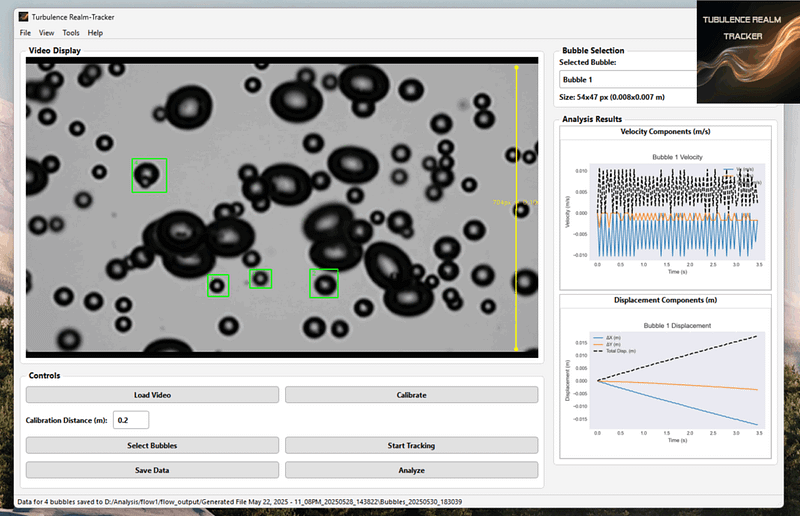
I built Turbulence Realm-Tracker because I got tired of manually tracking bubbles and particles in fluid flow videos. It’s a straightforward tool that uses Dlib to track selected regions, like bubbles, through a video and turns that into real velocity and displacement data. Nothing fancy, just a practical workflow: load your video, calibrate the scale, pick the regions you care about, and let it track the motion automatically.
Features of the Software
Here’s what it can do:
Video Loading: Supports MP4, AVI, MOV, and MPEG. Just drag and drop or open through the menu.
Zoom Controls: Zoom in and out with Ctrl++, Ctrl+-, and Ctrl+0 to inspect specific areas.
Spatial Calibration: Draw a line over a known real-world distance in the video, and the software calculates the scale (meters per pixel). This converts all pixel measurements into actual units.
Region Selection: Select rectangular regions around bubbles or particles you want to track. Each ROI gets added to a dropdown for easy management, and the initial bubble size is shown in both pixels and meters.
Automated Tracking: Uses a correlation tracker to follow selected bubbles through the entire video with real-time visual feedback.
Live Plots: As tracking runs, the software generates and updates velocity and displacement plots for the selected bubble in real time.
Data Export Capabilities:
CSV Data Export: All raw tracking data, including per-frame pixel positions, calculated velocities (X and Y components, and total speed in m/s), and displacements (X and Y components, and total magnitude in m), can be exported to CSV files. Each CSV file is timestamped and includes initial bubble size information as a comment.
Plot Export: The generated velocity and displacement plots can be exported as high-resolution PNG image files for use in reports or presentations.
Comprehensive Statistics: The “Analyze” feature provides a summary of key statistics for all tracked bubbles, including average and maximum speeds, and final displacement magnitudes, along with the initial bubble size.
Keyboard Shortcuts: Common actions like opening files, saving results, and managing zoom are accessible via convenient keyboard shortcuts.
Advantages of Turbulence Realm-Tracker
The Turbulence Realm-Tracker offers several significant advantages for fluid dynamics analysis:
Accuracy in Measurement: The robust calibration feature ensures that all velocity and displacement measurements are converted from pixels to real-world metric units (meters and meters per second), providing scientifically accurate data.
Efficiency in Analysis: Automating the tracking process saves considerable time compared to manual methods. Users can quickly process long video sequences and obtain quantitative results.
User-Friendly Design: The intuitive graphical interface makes the software accessible to users with varying levels of technical expertise. The step-by-step workflow (load, calibrate, select, track, analyze, save) is easy to follow.
Comprehensive Data Output: The ability to export both raw CSV data and high-quality PNG plots provides flexibility for further analysis, reporting, and publication. The inclusion of bubble size in the output files adds valuable context to the tracking data.
Real-time Feedback: The immediate visualization of tracking progress and real-time updates of velocity and displacement plots allow users to monitor the analysis and make informed decisions.
Customization and Control: Users have control over the calibration distance, the selection of multiple bubbles, and the ability to stop tracking at any point, offering flexibility in their analysis.